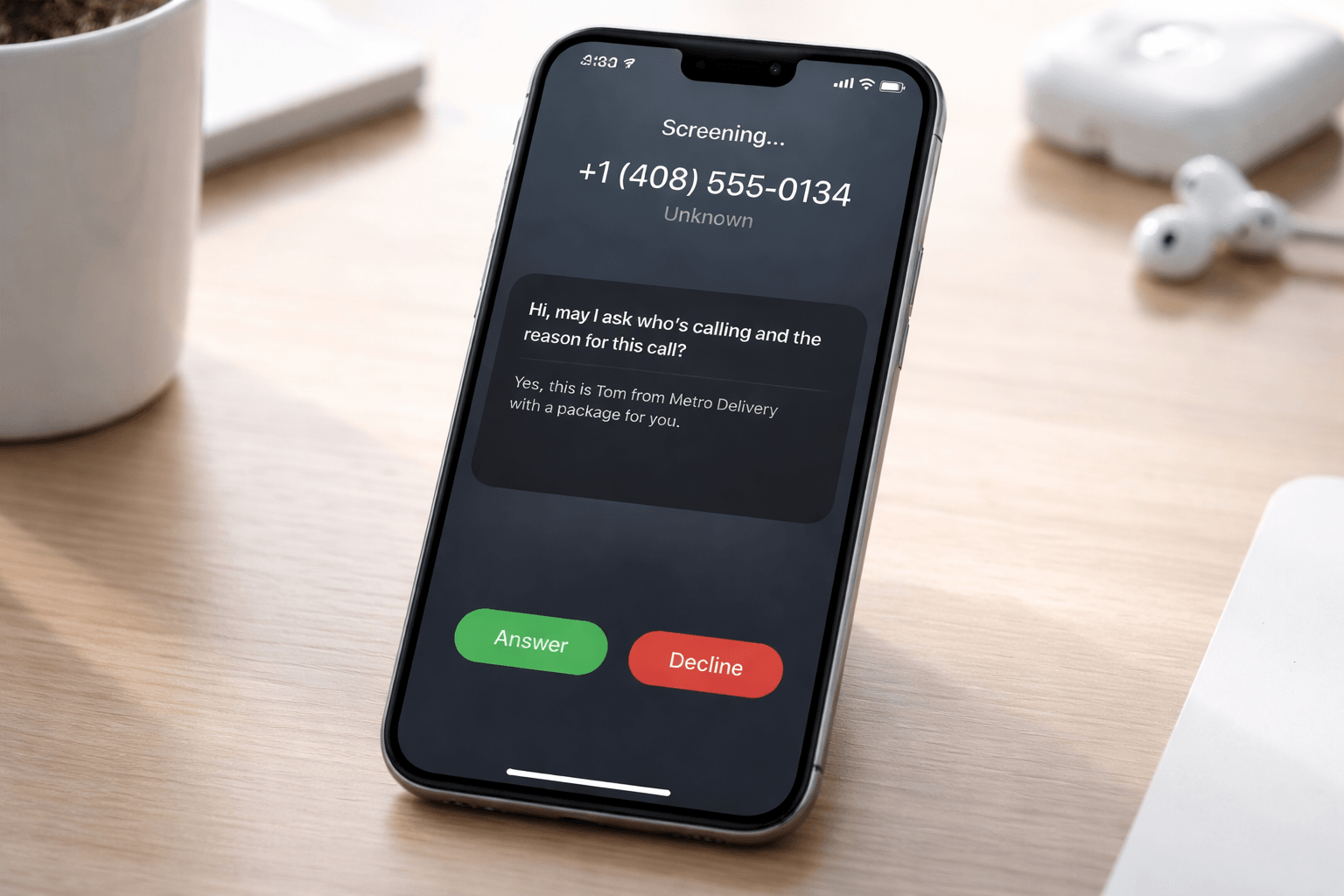
The iOS 26 Phone app call screening feature represents one of Apple’s most practical updates in recent years. Instead of adding flashy visuals or complex settings, Apple focused on a daily annoyance shared by millions. Unwanted calls.
Within the first few minutes of using iOS 26, Apple users notice fewer interruptions. Unknown numbers no longer demand instant attention. The Phone app now asks questions first.
This change might seem small, but its impact is immediate. Call screening transforms how users interact with incoming calls, especially when those calls come from unknown or suspicious numbers.
What Is the iOS 26 Phone App Call Screening Feature
Call screening in iOS 26 allows the Phone app to request information from unknown callers before notifying the user. The caller is asked to state the reason for calling. The user then sees that context and decides whether to answer.
This approach flips the traditional phone experience. Instead of reacting to every ring, users gain control.
Apple does not automatically block calls. It filters them intelligently.
Why Apple Introduced Call Screening in iOS 26
Spam calls remain a widespread issue. Blocking numbers helps, but it is reactive and incomplete.
Apple recognized that users wanted fewer interruptions, not just better blocking tools.
The iOS 26 Phone app redesign focuses on prevention. Call screening stops many spam calls before they ever become distractions.
This shift aligns with Apple’s broader emphasis on user experience and privacy, principles that are core to the company’s identity as outlined by Apple Inc. on Wikipedia.
How Call Screening Works on iPhone
When an unknown number calls, the Phone app does not immediately ring. Instead, iOS 26 prompts the caller to explain why they are calling.
The response is shared with the user. At that point, the user can choose to answer, ignore, or decline.
This simple step filters out robocalls and spam while allowing legitimate callers to get through.
It is quiet. It is effective. And it feels intentional.
iOS 26 Call Screening vs Older Phone App Versions
Previous iOS versions offered features like silence unknown callers and spam identification. Those tools reduced noise, but they also caused missed calls.
Call screening improves on that system.
Users now receive context, not just silence. Important calls feel important again.
That difference matters.
Privacy and On-Device Processing
Apple processes call screening using on-device intelligence. This means call data stays on the device rather than being sent elsewhere.
Privacy remains central to Apple’s design philosophy. According to Apple’s official privacy overview, user data is handled with strict protections.
Call screening fits naturally into this approach. Users gain control without sacrificing privacy.
Who Benefits Most From Call Screening
The iOS 26 Phone app call screening feature benefits a wide range of users:
- Apple users tired of spam calls
- iPhone owners who receive frequent unknown calls
- Older users targeted by scam callers
- Professionals who value focus
Reducing interruptions improves productivity. It also reduces stress.
Small changes often have the biggest impact.
Call Screening and Apple’s Broader Software Strategy
Apple’s recent updates emphasize refinement over reinvention. Instead of radical changes, Apple improves everyday experiences.
We see this approach across Apple’s ecosystem, from network performance improvements discussed in 5G in 2026 to security-focused updates like Instagram password reset email attacks.
Call screening follows the same pattern. Quiet improvements that users quickly depend on.
How Call Screening Changes Daily Phone Use
After enabling call screening, users notice something unexpected. Their phone rings less.
When it does ring, it usually matters.
This change improves focus and reduces the constant low-level stress associated with spam calls.
The Phone app finally feels supportive rather than disruptive.
Is Call Screening Enough to Stop All Spam Calls
No solution is perfect. Some spam calls will still get through.
However, call screening significantly reduces interruptions. It adds a barrier that most automated spam systems cannot easily bypass.
According to Wikipedia’s overview of robocalls, automated calling systems rely on speed and volume. Call screening slows them down.
That alone makes a difference.
Should Apple Users Enable Call Screening
For most users, yes.
There is little downside. Legitimate callers can still explain their reason for calling. Spam callers usually disappear.
Once enabled, many users report they never want to turn it off.
Final Thoughts on the iOS 26 Phone App Redesign
The iOS 26 Phone app call screening feature is not dramatic. It does not demand attention.
Instead, it removes unnecessary noise from daily life.
Apple did not reinvent phone calls. It refined them.
And that refinement quietly makes iOS 26 one of the most user-friendly updates yet.
FAQ Section
What is the new call screening feature in iOS 26
It allows the Phone app to ask unknown callers to explain why they are calling before notifying the user.
How does Apple’s call screening work
The caller provides a reason for the call, which the user sees before choosing to answer or decline.
Does call screening reduce spam calls
Yes. It filters many spam and robocalls before they reach the user.
Is call screening private
Yes. Apple processes call screening on the device, keeping user data private.
Can users disable call screening
Yes. The feature can be managed through Phone app settings.